Scaffold Material Calculator: material lists generated automatically from your 3D model
Model the scaffold once in SMART Estimator and get the full material list, weights and tonnage. Then carry the quantities straight into your costs and a professional quotation.
Software for scaffold contractors · Not a free online calculator
Watch the 68-second overview. Bring a live job to your demo and we’ll model it for you.
Change the scaffold. Watch the material list update.
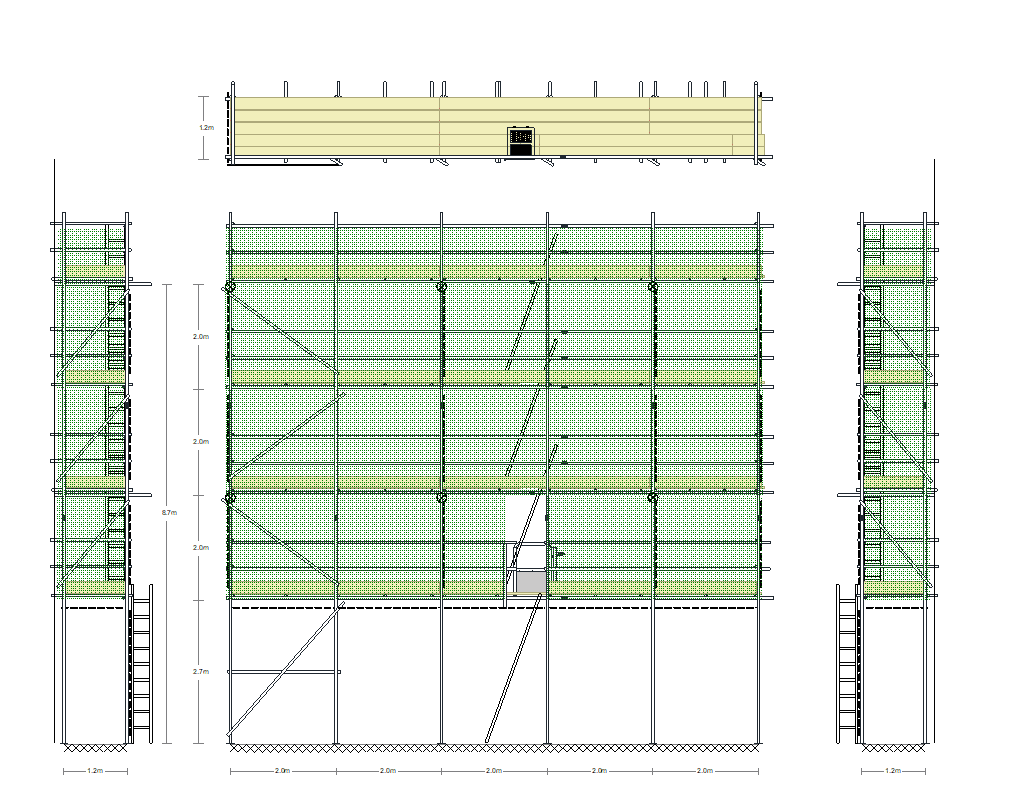
This is a cut-down preview of SMART Estimator. Pull a wall to resize the building, drag the top lift to change the height, or type exact sizes, and the material list on the right recalculates as you go. The full product models any scaffold, prices it and produces drawings, quotes and material lists.
Demonstration only – not for real scaffolding projects.This preview is a simplified, representative model built to show how SMART Estimator generates a material list. It is not a design or estimating tool: the quantities, weights and tonnage it shows must not be used to order materials, price work or plan any real scaffold. Live projects need SMART Estimator and a competent estimator or designer.
Works best with a mouse or trackpad; on a phone the model and list stack.
Know the Materials. But Do You Know What the Job Will Actually Cost?
Material quantities are only part of a profitable scaffold quotation. SMART Estimator helps you calculate scaffold materials automatically, understand your costs and produce professional quotes — without relying on manual counting and disconnected spreadsheets.
How automatic material lists work

Model Your Scaffold
Create or adapt your scaffold design in SMART Estimator using Model It or Schedule It, from a customer PDF, DWG or a blank site.

Generate Your Material List
Run the Material List report to calculate the scaffold components, quantities, weights and tonnage required.

Estimate with Confidence
Carry the quantities into cost analysis and your branded quotation, so the price reflects the scaffold you will actually build.
Why scaffold contractors stop counting by hand
Manual material calculations
- ✕Counting standards, ledgers, transoms, boards and fittings from a drawing takes time you could spend pricing the next enquiry.
- ✕Spreadsheets and mental arithmetic introduce errors that only show up on site.
- ✕Every design change means recounting from the start.
- ✕Different estimators produce different quantities for the same job.
- ✕A quantity list on its own still does not tell you what the job will cost.
SMART Estimator automatic material lists
- ✓Component quantities, weights and tonnage come straight from the 3D model.
- ✓One source of quantities for every estimator in the business.
- ✓Change the scaffold and re-run the report; the list reflects the new design.
- ✓Less repetitive administration and fewer manual checks.
- ✓Quantities flow into cost analysis and professional quotations.
Why Material Accuracy Matters
Every scaffold estimate depends on accurate quantities.
Missing components reduce profitability.
Overestimating materials makes quotations uncompetitive.
Manual counting from drawings is not only slow but can produce inconsistent results between estimators, making it difficult to standardise pricing across the business.
By generating quantities automatically from a digital scaffold model, every estimate is based on the same accurate source of information.
Automatic Material Lists in Seconds
As you build your scaffold model in SMART Estimator, every component is tracked automatically.
Instead of counting tubes, boards, fittings and system components manually, the software produces a complete material schedule instantly.
This includes:
- Tube quantities
- Boards and decking
- Standards and ledgers
- Transoms
- Bracing
- Base plates
- Fittings
- System scaffold components
- Accessories
- Total scaffold tonnage
Every material list updates automatically as the scaffold model changes, ensuring your estimate always reflects the latest design.

More Than Just a Material List
The automatically generated quantities become the foundation for the rest of the estimating process.
Cost Analysis
Material quantities feed directly into your company pricing structure to produce accurate project costs.
Professional Quotations
Component quantities are automatically incorporated into client quotations and supporting documentation.
Cost Analysis
Material quantities feed directly into your company pricing structure to produce accurate project costs.
Professional Quotations
Component quantities are automatically incorporated into client quotations and supporting documentation.

Reduce Errors and Standardise Estimating
Generating material quantities automatically provides significant operational benefits.
Eliminate Manual Counting
Reduce hours spent measuring drawings and counting scaffold components.
Improve Accuracy
Generate consistent quantities directly from the scaffold model.
Standardise Estimates
Every estimator works from the same digital process, reducing variation between quotations.
Save Time
Produce complete material schedules in seconds rather than hours.
Increase Profitability
Accurate quantities help reduce underpricing, material shortages and unnecessary contingency.

Why Choose SMART Estimator?
SMART Estimator has been developed specifically for scaffold contractors who need fast, accurate estimating without relying on spreadsheets or manual calculations.
Using intelligent 3D scaffold modelling, the software automatically generates material schedules, tonnage, labour calculations and pricing information from a single digital model.
Trusted by scaffold contractors across the UK, SMART Estimator helps businesses reduce estimating time, improve quotation consistency and produce professional documentation with confidence.

Frequently Asked Questions
How do you calculate scaffold material quantities?
Traditionally by measuring the elevation, working out bays and lifts, then counting standards, ledgers, transoms, boards, bracing and fittings for each. SMART Estimator does this from a 3D model of the scaffold: the quantities are read from the model rather than counted by hand.
What is a scaffold material list?
A scaffold material list (sometimes called a load list or kit list) itemises every component needed to build a scaffold, with quantities and usually weights. SMART Estimator’s Material List report includes tube and fitting and system scaffold components, accessories and total tonnage.
What is a scaffold material calculator?
Software that works out the components a scaffold needs from its dimensions or a digital model. This page describes SMART Estimator, which generates material lists from a 3D scaffold model as part of its estimating workflow. It is not a free online calculator.
Can scaffold material calculations be automated?
Yes. In SMART Estimator the material list is generated from the scaffold model, so there is no separate counting step. The same model produces drawings, tonnage, cost analysis and the quotation.
Can SMART Estimator update material quantities when a scaffold design changes?
Yes. Change the model, for example by adding a lift or extending a bay, and re-run the Material List report. The quantities reflect the revised design.
Does SMART Estimator calculate scaffold tonnage?
Yes. Weights and total tonnage are reported with the material list, which helps with transport planning, procurement and hire costing.
Can scaffold material lists be used to prepare quotations?
Yes. Material quantities feed SMART Estimator’s cost analysis, where your labour, hire and material rates are applied, and the result flows into a branded quotation with drawings and 3D views.
How does scaffold estimating software calculate materials?
It builds the scaffold as a model with real components and counts what the model contains. Because every estimator works from the same model, quantities are consistent across the business.

“Smart Estimator has revolutionised the way we approach 3D scaffolding design and quoting. Gone are the days of tedious manual calculations and estimations…”
Culmex Construction
“The accurate material lists and professional, detailed quotations it produces have significantly enhanced my workflow, enabling me to quote more efficiently and win more projects. Additionally, the load list feature allows me to seamlessly hand over to the operations team for stock control, and Model IT provides site crews with detailed plan and elevation drawings, so they understand what has been included in the pricing.”
TWK Scaffolding
Testimonials




From Estimate to Site – without re-entering Data
Once a job is won, many scaffolding businesses must re-enter estimate data into separate systems for handovers, inspections, and site management. That duplication increases admin, wastes time and introduces inconsistencies between office and site teams.
SMART Estimator integrates directly with the wider SMART Scaffolder suite. Estimate data flows into SMART Manager automatically, allowing operations teams to access site details without re-keying information.
This connected workflow:
- Eliminates duplicate data entry
- Reduces administrative workload
- Maintains consistency between estimating and operations
- Speeds up mobilisation once a project is secured
The result is a smoother transition from tender to delivery — with less friction across the business.

“Communication gaps, billing errors, and inefficiencies slowed us down. Since implementing the software, we’ve gained full visibility of our projects, improved accuracy, and streamlined billing, meaning nothing gets missed.”
Infinity Scaffolding Ltd